

Can I use Quark Drive normally in Singapore, or will it be restricted because it's a mainland app?
You can use it,but the experience depends on your
but the experience depends on your network. Quark won't ban or disable your account just because you're in Singapore; the main obstacle is that its servers are inside mainland China, so a cross-border direct connection may time out, load slowly, and be unstable at times. For registration you can use WeChat QR-code login to get around needing a mainland phone number, and the account works just the same overseas. For smooth access you usually need to pair it with a back-to-China accelerator or back-to-China VPN to connect via a nearby node. Also, storing content such as overseas film and TV carries a risk of being screened and deleted, so it's best to keep multiple local backups of important files.
Will saving to drive and downloading resources on Quark Drive be throttled in Hong Kong?
Saving to your drive (transferring to your own Quark Drive) is usually very fast in Hong
Kong,because it's just a cloud-to-cloud operation. What's actually slow is downloading to your local device: on one hand, free accounts inherently have low download speeds (measured at around a few hundred KB/s), and only SVIP gets a dedicated channel for higher speeds; on the other hand, the cross-border link from Hong Kong to servers in mainland China also drags the speed down. So even with a membership, overseas downloads may still be slow because of the cross-border link. To improve things you can use a back-to-China accelerator plus local network optimization, and consider SVIP for large files.
Can Taiwan users register for Quark Drive and access files normally?
Yes. Taiwan users don't need a mainland-China phone number and can register using WeChat
QR-code login: first register WeChat with a Taiwan or overseas phone number,then go to the Quark Drive web version, click 'WeChat login,' scan the code, and tap 'Allow authorization'; after logging in, if a prompt to link a phone number pops up you can simply ignore it, and you'll still get 10GB of free space just for signing up. Uploading, downloading, saving to drive, and previewing files all work normally. The only catch is that cross-border access may be a bit slow, so for smoothness you can pair it with a back-to-China accelerator; for important files it's best to keep a separate local backup.
What are the complete steps for saving a shared resource to Quark Drive for the first time on an Android phone in Thailand?
On Android in Thailand you can follow this process: (1) first register a WeChat account
using a Taiwan or overseas phone number;(2) install the Quark app (when you can't find it in domestic app stores, download and install it from a third-party market such as APKPure); (3) open Quark, go into the drive, choose 'WeChat login', scan the QR code with WeChat and tap 'Allow authorization'; if a 'bind phone number' prompt pops up you can just ignore it; (4) open the share link someone gave you and tap 'Save to drive' to save it to your own drive; (5) download later when you need to, and if the direct connection is slow, turn on a back-to-China accelerator. You get 10GB of free space just for registering. You'll need to test it yourself to confirm the wording of the entry points in the current app version.
What's the full process for installing Quark Drive on an iPhone in Singapore to watch mainland China shows?
On an iPhone in Singapore you can do it this way: (1) first register WeChat using a Taiw
an or overseas phone number;(2) download the Quark app -- Quark apps are listed mainly on the mainland China App Store, so you need a mainland China Apple ID to find and download it (some versions are also available in the Hong Kong store); using a domestic Apple ID from overseas may mean you can't find it, which is a regional listing restriction; (3) once open, log in by scanning the QR code with WeChat and tap 'Allow authorization', and ignore the bind-phone-number prompt if it appears; (4) save the show's share link to your own drive, then stream or download it, and turn on a back-to-China accelerator if the direct connection is laggy. A reminder: overseas film and TV resources are heavily scrutinized and easily deleted, so don't keep important content only on Quark. You'll need to test it yourself to confirm whether you can find it in your Apple ID's region.
Can resources stored on Quark Drive be deleted by the platform, or can my account be banned?
Yes,there's a risk. The platform runs automatic re
there's a risk. The platform runs automatic review on uploaded content, and anything in violation will be blocked or deleted, making the link invalid. In addition, since April 2026 the cloud-storage industry has been conducting strict purges of overseas film and TV resources (American, Korean, Thai dramas, and so on), and large amounts of resources on Quark have been taken down and deleted; merely renaming a file may still be detected and cleaned up by the system. So the community consensus is: don't keep important or sensitive files only on Quark; always keep a local backup and store copies across multiple platforms, and never keep your only copy there. You'll need to test it yourself to confirm whether the content you've stored crosses any copyright or compliance red lines.
How do I download files I've saved on Quark Drive to my phone's local photo album?
First open the photos or videos you've saved to your own drive in the Quark app,
tap the download/save button, and choose to save them locally or to your album; after downloading, photos and videos usually appear in your phone's album. If they don't appear, check whether you've granted Quark permission to access your album. Note that free accounts have slow download speeds (measured at around a few hundred KB/s), so large files take a while, and overseas this is compounded by the slow cross-border link. Go by the actual button labels and permission settings in the app.
How do I download a movie from Quark Drive to my computer?
After logging in to the Quark Drive web version or client on your computer,
go to 'Netdisk,' find the video file, and tap download to save it locally. Be mentally prepared: free users measure download speeds of only about 650 to 700KB/s, so a movie of just over 1GB may take 30 to 40 minutes; with SVIP's dedicated channel it measures around 11MB/s, finishing in about a minute. Overseas Chinese users will also be slower due to the cross-border link and can pair it with a back-to-China accelerator. The community has other makeshift methods like 'send to phone then download locally,' but they're unverified, risky, and may violate the terms.
FAQ
Below are the most common questions and answers about Quark Drive Overseas Use and Regional Scenario Guide. Click any question to read the full details.
Can Quark Drive do offline downloads of magnet links or BT torrents?
Quark SVIP members get an offline download feature (a quota of roughly 100 times per month), which can be used for offline download tasks. But the specific support for magnet links / BT torrents isn't clearly stated in the information and needs to be verified through hands-on testing. Also note: offline downloads involving copyrighted or rule-violating resources will likewise trigger the platform's automatic review and sweeps and get deleted; starting in April 2026 the sweep of overseas film and TV content has been strict, and renaming doesn't work, so keep a separate local copy of important content.
I can't find Quark Drive in the overseas iPhone App Store. How do I install it?
You can't find it because Quark's apps are mainly listed in the China App Store, with some versions also in the Hong Kong store, so an overseas Apple ID may not turn them up; this is a regional availability limit, not a ban. Solutions: (1) Sign in to the App Store with a China Apple ID, then search and download (Quark Drive has a standalone app, plus Quark HD and others); (2) If you don't have a China account, switch to an Android phone and install the APK from a third-party store such as APKPure; (3) You can also use the web version quarknetdisk.com with WeChat login. Test it to confirm whether it can be found in the Hong Kong store.
How do I download and install the Quark Drive app on an Android phone, and is it on Google Play?
Quark is mainly listed through domestic Chinese channels, and it may not be on Google Play. On Android you can search 'Quark' in domestic app stores (Tencent App Store / Baidu Mobile Assistant / OPPO, and so on) to download the Quark app, then once inside, tap 'Netdisk' in the browser menu page to use it; the latest version is around v10.x. If domestic stores are inconvenient for overseas users, the community workaround is to download the installer via a third-party market like APKPure to bypass that. After installation, you need to log in with a phone number or WeChat.
Can I download the Quark Drive app with a Taiwan Apple ID?
You may not be able to find it. The Quark family of apps is mainly listed in the China (CN) App Store, with some versions also in the Hong Kong region; with a Taiwan Apple ID you may not find it from overseas, and this is a regional listing restriction, not a ban. Viable options: switch to a China-region (or, where listed, Hong Kong-region) Apple ID to download, or simply use Android plus a third-party market like APKPure to install directly and bypass the iOS regional restriction. Note that downloading across regions with a domestic Apple ID may require you to fill in a mainland address and phone number.
Does Quark Drive have a Windows desktop client, and where do I download it?
The information doesn't provide a specific download entry for the Windows desktop client, so this needs to be verified through hands-on testing (the community mentions a desktop automatic-backup feature, but the installation source isn't given in the information). The most reliable install-free method is to use the web version directly: open the Quark Drive web version in your computer browser, choose 'WeChat login,' scan the QR code, and you can use features like upload, download, and sharing without installing a client.
How do I download and install the Mac version of Quark Drive?
The information doesn't cover the download and installation steps for a Quark Mac client, so this part should be confirmed based on the official source or app, and verified through hands-on testing. You can use an alternative for now: open the Quark Drive web version directly in your Mac browser, choose 'WeChat login' and scan the QR code to authorize, and you can use the drive's basic features like upload, download, sharing, and save-to-drive without installing a dedicated client.
What's the web address for Quark Drive, and can I use it directly without downloading the app?
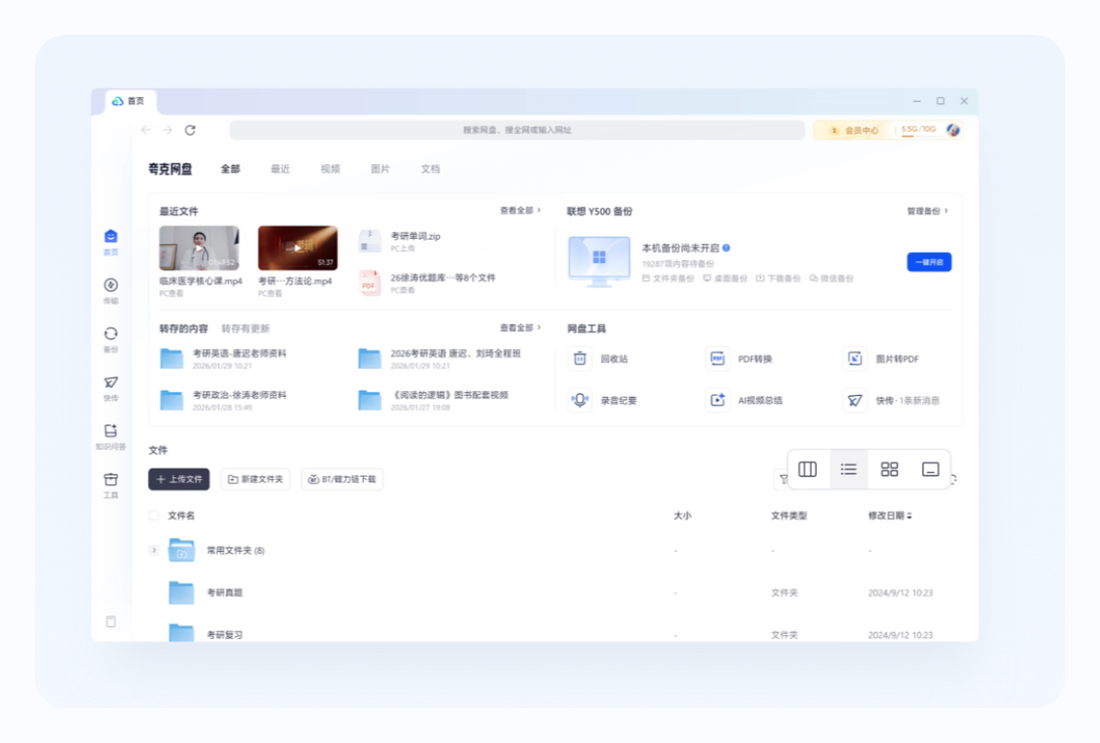
The official web entry for Quark Drive is quarknetdisk.com. You can use the web version directly without downloading the app: after opening it, choose 'WeChat login' to bring up the QR code, scan it with WeChat on your phone and tap 'Allow authorization' to get in, and if a bind-phone-number prompt appears you can ignore it. The web version lets you complete common operations like upload, download, sharing, and save-to-drive, making it suitable for overseas users who don't want to install the app.
Between Quark Drive and Baidu Netdisk, which is better for overseas Chinese users?
The information doesn't provide direct comparison data for Baidu Netdisk, so the following only addresses Quark's situation for overseas Chinese users: you can register via WeChat QR-code scan to bypass the mainland phone number, with 10GB free; but the servers are inside mainland China, so connecting directly from overseas often times out and is slow, requiring a back-to-China accelerator or VPN to improve, and free downloads are only a few hundred KB/s. Its strengths are an active resource-finding ecosystem; its weaknesses are cross-border speed and the risk of content sweeps. You'll need to compare and test the two for yourself.
Compared with Thunder and Alibaba Cloud Drive, which is better for finding resources?
The information doesn't provide comparison data for finding resources on Thunder or Alibaba Cloud Drive, so a direct ranking isn't possible and you'll need to test and compare for yourself. As for Quark, it's known in the community for an active 'resource-finding' ecosystem, with plenty of share and save-to-drive links. But note: the platform strictly sweeps rule-violating and overseas film and TV content (American, Korean, Thai dramas), and starting in April 2026 a large amount of content has been taken down, with renaming potentially still leading to deletion. So 'being able to search for it' and 'being able to keep it long-term' are two different things.
Why does everyone recommend using Quark Drive to find resources instead of Baidu?
The information doesn't provide an item-by-item comparison with Baidu, so here we can only describe Quark itself: backed by Alibaba, it has an active resource-sharing and save-to-drive ecosystem, is often used in the community to find content such as film and TV, and has a relatively low registration barrier for overseas Chinese users (WeChat login without a mainland phone number). But view it with clear eyes: the platform sweeps rule-violating and overseas film and TV content very strictly, and starting in April 2026 a large amount of content has been deleted with renaming not working, so the stability of resources is not guaranteed. The specific 'why it's better than Baidu' comparison needs to be tested for yourself.
Quark Drive won't open in Indonesia and keeps loading. Is it blocked, or do I need a VPN?
It's more likely a cross-border network issue than a regional block. Quark's servers are mainly located inside mainland China, so connecting directly from Indonesia and other parts of Southeast Asia has to route through international gateways, which easily causes high latency, packet loss, and loading timeouts. For most overseas users, the practical fix is to use a back-to-China accelerator or VPN to connect to a nearby mainland China node, combined with a 5GHz Wi-Fi or wired connection and restarting your router and modem. Note that slow access and the need for a Chinese phone number to register are two separate issues; the former is solved by an accelerator. You'll need to test it yourself to confirm how your local route actually performs.
How do I fix a Quark Drive login error that says 'network error' or 'abnormal environment'?
When you see a 'network error' logging in from overseas, it's usually related to an unstable cross-border connection: Quark's servers are inside mainland China, and direct connections easily time out. First try connecting via a nearby node using a back-to-China accelerator or VPN, then retry on a stable 5GHz Wi-Fi or wired connection and restart your router and modem. If you're logging in by scanning the QR code with WeChat, make sure you tapped 'Allow authorization' after scanning. There are also scattered community reports that the WeChat side may also require a Chinese phone number for verification, but this claim isn't confirmed by multiple sources and may change between versions. You'll need to test it yourself to confirm what specifically triggers the 'abnormal environment' message on your end.
How do I re-download a Quark Drive file that failed halfway or got corrupted?
When Quark Drive downloads fail or files get corrupted overseas, it's usually due to an unstable cross-border connection or speeds being too slow (free users have measured only a few hundred KB/s, and large files take longer and are more prone to dropping). Practical fixes: delete the unfinished file and download it again; before downloading, connect via a nearby node using a back-to-China accelerator or VPN and switch to a 5GHz or wired network to reduce packet loss; for large files, prioritize downloading during off-peak hours, or get SVIP to use the dedicated channel for faster, more stable speeds. You'll need to test it yourself to confirm whether the file is complete after re-downloading.
Can Quark Drive be used normally in Indonesia?
Yes, it works, but the experience depends on your network. Quark's servers are mainly inside mainland China, so connecting directly from Indonesia may bring slow loading, timeouts, and video lag, and you'll often need a back-to-China accelerator or VPN to connect via a nearby node for stability. As for registration, an Indonesian local phone number can't receive Chinese verification codes, so you can switch to logging in by scanning the QR code with WeChat to get around it (first register WeChat using a Taiwan or overseas phone number), and registering still gives you 10GB. On iOS you need a mainland China Apple ID to download it, and on Android you can use APKPure. You'll need to test it yourself to confirm how your local route performs and whether the app is downloadable.
Can Quark Drive be used in the Philippines?
Yes, it can be used, and the principle is the same as in other parts of Southeast Asia: Quark's servers are inside mainland China, so connecting directly from the Philippines may be slow or time out. It's recommended to connect via a nearby node using a back-to-China accelerator or VPN, and to use a 5GHz or wired network for better results. When registering, a Philippine local number can't receive Chinese SMS verification codes, so just switch to logging in by scanning the QR code with WeChat to get around it (first register WeChat using a Taiwan or overseas phone number), and you'll get 10GB of free space for registering. On Android, install the app via APKPure; on iOS you need a mainland China Apple ID. You'll need to test it yourself to confirm access and downloading in your area.
Can I log in to Quark Drive in Cambodia?
Yes, you can log in. A Cambodian local phone number can't receive Chinese verification codes, so the official phone-number channel won't work, but you can switch to logging in by scanning the QR code with WeChat to get around it: first register a WeChat account using a Taiwan or overseas phone number, then go to the Quark web version or app, choose 'WeChat login', scan the QR code and tap 'Allow authorization'; ignore the bind-phone-number prompt if it appears, and after logging in you still get 10GB. Slow access is because the servers are in mainland China plus the cross-border route, so it's recommended to pair it with a back-to-China accelerator. You'll need to test it yourself to confirm login stability on your local network.
How do I fix not receiving the SMS code when registering Quark Drive with a Malaysian number?
This is a common situation: the SMS verification code for official registration and login is only available to mainland China phone numbers, so overseas numbers from Malaysia and elsewhere can't receive the code. The most practical solution is to switch to logging in by scanning the QR code with WeChat to get around it -- first register a WeChat account using a Taiwan or overseas phone number, then go to the Quark web version or app, choose 'WeChat login', scan the QR code and tap 'Allow authorization'; if a bind-phone-number prompt pops up you can just ignore it, and you're good to go, with 10GB still granted for registering. Relying on overseas SMS-receiving platforms isn't recommended (they're easily banned and risky). You'll need to test it yourself to confirm WeChat login still works in your current version.
Can I log in to Quark Drive overseas by scanning the QR code with WeChat?
Yes, this is the most recommended method for overseas users. Quark Drive officially supports WeChat authorized login: first register a WeChat account using a Taiwan or overseas phone number, then go to the Quark web version or app and choose 'WeChat login', open the '+' in the top-right corner of WeChat, choose 'Scan', point it at the QR code, and be sure to tap 'Allow authorization'; after logging in, if a 'bind phone number' prompt appears you can just ignore it, with no mainland China phone number needed. This is a built-in official feature, not a workaround. Note that there are scattered reports that the WeChat side may also require a Chinese number; this claim isn't fully confirmed and may change between versions.
Can I use an overseas SMS-receiving platform to register Quark Drive? Is it safe?
Using an overseas SMS-receiving platform to register Quark Drive isn't recommended. While SMS-receiving services (virtual numbers that receive verification codes) could in theory let you complete a phone-number registration, sources point out that virtual numbers are easily detected and banned by the platform, and the numbers on these services may be shared by many people, creating a risk of having your account stolen or losing your data. The safer approach is to use the officially supported WeChat QR-code login to get around the phone number altogether (first register WeChat using a Taiwan or overseas phone number, then scan and authorize, ignoring the bind prompt); it's both legitimate and hassle-free, with 10GB still granted for registering. You'll need to test it yourself to confirm whether SMS-receiving numbers are still blocked in the current registration flow.
Can I download Quark Drive from the Hong Kong App Store?
There's a chance. Quark apps are listed mainly on the mainland China (CN) App Store, but some versions are also available in the Hong Kong (HK) store, so a Hong Kong Apple ID may not necessarily find the full Quark Drive app. If you can't find it in the Hong Kong store, you can switch to a mainland China Apple ID to download it, or on Android install it directly from a third-party market such as APKPure. This is a regional listing restriction, not a block. You'll need to test it yourself to confirm whether the version of Quark Drive you want is currently in the Hong Kong store.
Sources:夸克网盘官方页, 夸克官方网站, 中国互联网络信息中心